- Board index ‹ General ‹ ITST
ITST TV
Moderator: Senior Hosts
 by picachu211 » Fri, 20 Mar 2009 15:54
Watching the highlights, I can't help noticing how slow and soft my shots were...
- picachu211
- Posts: 1099
- Joined: Mon, 07 Jul 2008 01:32
by djarvik » Fri, 20 Mar 2009 16:07
picachu211 wrote:Watching the highlights, I can't help noticing how slow and soft my shots were...
I got the same feeling when I saw myself. I think the reordered video runs a little slower that it is in actuality. Even Robs serve looks soft.
Your returns are amazing!
Level 13 Edberg and counting...
-

djarvik - ITST General Manager
- Posts: 13330
- Joined: Fri, 15 Aug 2008 14:57
by Mack2300 » Fri, 20 Mar 2009 16:28
Ye guys are lucky to be able to watch yourselves here. I think it must a great benefit to be able to watch yourself play as then you can really analyse your own game and see what shots need to be improved and if you become too predictable with certain shot selections, etc.. That can be hard to judge when you are actually playing a match 

TITLE COUNT: 4
(Copa Telmex)
(ABN AMRO WTT)
(Allianz Suisse Open)
(Rogers Cup)
- Mack2300
- ITST Tournament Host
- Posts: 1190
- Joined: Wed, 05 Mar 2008 05:15
by Rob ITST » Fri, 20 Mar 2009 16:29
djarvik wrote:picachu211 wrote:Watching the highlights, I can't help noticing how slow and soft my shots were...
I got the same feeling when I saw myself. I think the reordered video runs a little slower that it is in actuality. Even Robs serve looks soft.
The game is just slow. I think it only feels fast when you're playing it.
Keep in mind too that I only showed the points where we actually had a rally. If one of us served and then just blasted a winner, it's not on the video - those are the boring, routine points that make up 99% of a match.
Mack2300 wrote: I think it must a great benefit to be able to watch yourself play as then you can really analyse your own game and see what shots need to be improved and if you become too predictable with certain shot selections, etc
I've watched my matches before to see if I can guess where I'll hit the ball. I'm always happy when I'm wrong.

- Rob ITST
- ITST Manager
- Posts: 8260
- Joined: Tue, 20 Sep 2005 01:32
- Location: The Party Capital of the World
by picachu211 » Fri, 20 Mar 2009 17:26
Rob ITST wrote:The game is just slow. I think it only feels fast when you're playing it.
Keep in mind too that I only showed the points where we actually had a rally. If one of us served and then just blasted a winner, it's not on the video - those are the boring, routine points that make up 99% of a match.
Yeah, I am glad this is so much better than these tiebreakers, no offence.

And I only managed something like two break points and Rob returned even better, plus I was being totally outrallied.
- picachu211
- Posts: 1099
- Joined: Mon, 07 Jul 2008 01:32
by Rob ITST » Sat, 21 Mar 2009 00:51
picachu211 wrote:Yeah, I am glad this is so much better than these tiebreakers, no offence.
The tiebreakers are the lazy way.
But even this didn't take too long, maybe 15 minutes, and it uploads much faster since it's shorter - I think I'll do highlights on all of them.- Rob ITST
- ITST Manager
- Posts: 8260
- Joined: Tue, 20 Sep 2005 01:32
- Location: The Party Capital of the World
by Rob ITST » Mon, 23 Mar 2009 20:49
A lot of people have been asking how to record matches from a 360 or PS3. So, here goes:
First, you need something to record with. A DVD recorder, a DVR, or a capture card should work. I use a DVD Recorder - a capture card is probably the easiest and cheapest - a DVR must have inputs that allow you to connect your console, and some way of getting the video to your PC (most can do this by hooking it up to your network through the Ethernet or USB port, and with software downloaded to your PC).
You'll also need software that will let you edit the video. This can be a little expensive (about $50 if you want good quality). If you need suggestions on this, I can help you out there - the software you need will depend on the format your recorder uses. If you use a capture card, it may have software that will do editing.
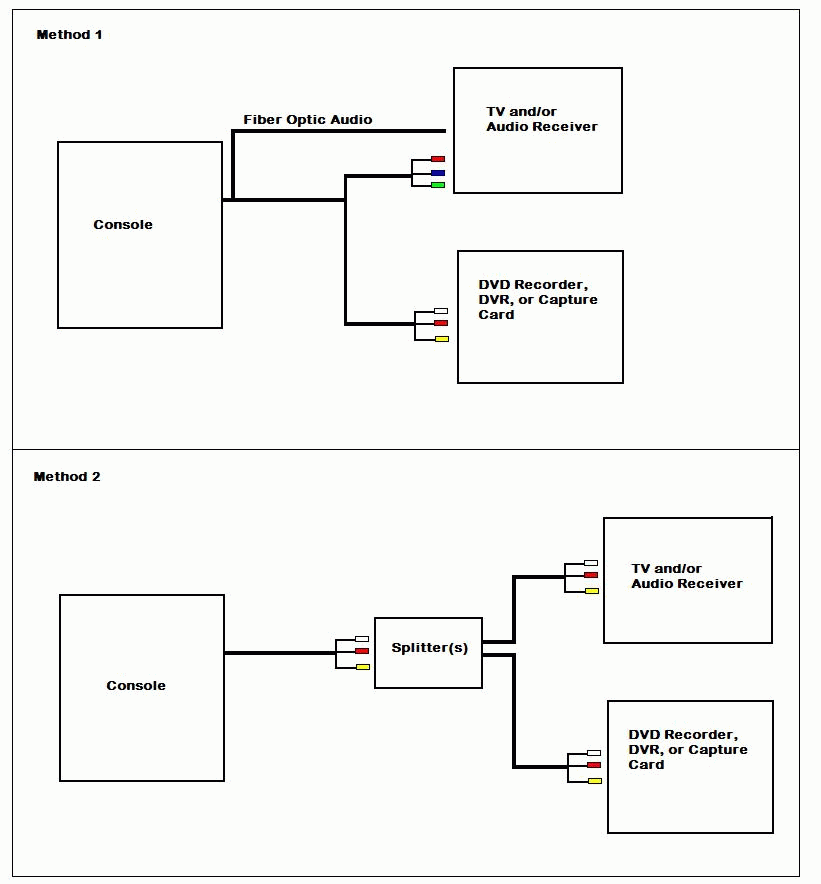
Then, there are a few ways to hook it all up so that you can see the game on your TV and record it at the same time. I made two wiring diagrams below - the first method (the one I use) uses the original cable that comes with the 360 (it has RCA (red/yellow/white) and Component (red/blue/green) on the same cable - one goes to the TV, the other goes to the recorder). The second method should work for anyone, including the PS3. You only need to split the cable - you'll probably need 3 of these (very inexpensive) > CLICK or CLICK
Here's the wiring diagram (click for full size):

First, you need something to record with. A DVD recorder, a DVR, or a capture card should work. I use a DVD Recorder - a capture card is probably the easiest and cheapest - a DVR must have inputs that allow you to connect your console, and some way of getting the video to your PC (most can do this by hooking it up to your network through the Ethernet or USB port, and with software downloaded to your PC).
You'll also need software that will let you edit the video. This can be a little expensive (about $50 if you want good quality). If you need suggestions on this, I can help you out there - the software you need will depend on the format your recorder uses. If you use a capture card, it may have software that will do editing.
Then, there are a few ways to hook it all up so that you can see the game on your TV and record it at the same time. I made two wiring diagrams below - the first method (the one I use) uses the original cable that comes with the 360 (it has RCA (red/yellow/white) and Component (red/blue/green) on the same cable - one goes to the TV, the other goes to the recorder). The second method should work for anyone, including the PS3. You only need to split the cable - you'll probably need 3 of these (very inexpensive) > CLICK or CLICK
Here's the wiring diagram (click for full size):
- Rob ITST
- ITST Manager
- Posts: 8260
- Joined: Tue, 20 Sep 2005 01:32
- Location: The Party Capital of the World
by Mack2300 » Tue, 24 Mar 2009 15:19
Rob ITST wrote:Added a match played against Anteros > CLICK
djarvik was trying to distract you
 and my first time seeing that topless glitch...how random
TITLE COUNT: 4
(Copa Telmex)
(ABN AMRO WTT)
(Allianz Suisse Open)
(Rogers Cup)
- Mack2300
- ITST Tournament Host
- Posts: 1190
- Joined: Wed, 05 Mar 2008 05:15


by djarvik » Tue, 24 Mar 2009 15:28
BTW, for future recordings, can we (well, for now it is just you Rob) include player skills? Just a 2,3 second screen shot of setups the opponent use.
Should make a more complete picture.
Should make a more complete picture.
Level 13 Edberg and counting...
-
djarvik - ITST General Manager
- Posts: 13330
- Joined: Fri, 15 Aug 2008 14:57
by Rob ITST » Tue, 24 Mar 2009 16:21
I originally had the player skills on this one, but the video was a little long and I edited them out along with some a few points. If the vidoe is too long, they reduce the quality. 
And I need to remember to turn off those notifications. All those messages from Djarvik......
And I need to remember to turn off those notifications. All those messages from Djarvik......
- Rob ITST
- ITST Manager
- Posts: 8260
- Joined: Tue, 20 Sep 2005 01:32
- Location: The Party Capital of the World
by SlicerITST » Tue, 24 Mar 2009 17:12
Perhaps you should include Top Spin in the title. Then when people search on Youtube for Top Spin 3 they find your movies (and the link to ITST  ). And when in the future Top Spin 4 would come out (or Top Spin 62) they would find your movies as well.
). And when in the future Top Spin 4 would come out (or Top Spin 62) they would find your movies as well.\'Readers are plentiful; thinkers are rare.\'
-

SlicerITST - ITST Manager
- Posts: 5974
- Joined: Sun, 17 Oct 2004 15:17
by Rob ITST » Tue, 24 Mar 2009 17:20
That might be best. I'll add that now.
I do include TopSpin in the "tags", so it should come up in a search. Actually, I tag it with various spellings of TopSpin (Top Spin, TopSpin3, TopSpin 3, etc) and "ITST".
I do include TopSpin in the "tags", so it should come up in a search. Actually, I tag it with various spellings of TopSpin (Top Spin, TopSpin3, TopSpin 3, etc) and "ITST".
- Rob ITST
- ITST Manager
- Posts: 8260
- Joined: Tue, 20 Sep 2005 01:32
- Location: The Party Capital of the World
by djarvik » Tue, 24 Mar 2009 17:43
This is another simple solution:
Cost: $90 (including editing software)
http://www.pinnaclesys.com/PublicSite/u ... r+Plus.htm
Will work only if your TV has Video/Audio Out.
Cost: $90 (including editing software)
http://www.pinnaclesys.com/PublicSite/u ... r+Plus.htm
Will work only if your TV has Video/Audio Out.
Level 13 Edberg and counting...
-
djarvik - ITST General Manager
- Posts: 13330
- Joined: Fri, 15 Aug 2008 14:57
Who is online
Users browsing this forum: No registered users and 1 guest